Power Apps Code Apps — What Pro Developers Actually Need to Know
Microsoft just made React and Vue first-class citizens in Power Platform. Here's what Code Apps really are, how they differ from PCF, and whether they're worth your time.
Power Apps has always had an awkward relationship with professional developers. You could build PCF components, sure — but you were still a guest in a low-code house. That just changed.
Code Apps went GA in February 2026. You can now build a full React or Vue app in VS Code, push it to Power Platform with one command, and it becomes a governed enterprise asset — same DLP, conditional access, and sharing policies as any canvas app.
That’s a big deal. But it’s also not what the marketing makes it sound like. Let me break down what this actually means in practice.
What Code Apps Are (and Aren’t)
A Code App is a custom web application built with any JavaScript framework — React, Vue, Angular, Svelte, whatever — that runs inside Power Platform as a managed app.
What you get:
- Full control over UI and logic (it’s your code, your framework)
- Microsoft Entra authentication baked in — no auth plumbing
- Access to 1,500+ Power Platform connectors from JavaScript
- One-command deploy via
pac code push - Enterprise governance automatically applied (DLP, conditional access, sharing limits, quarantine)
What you don’t get:
- Mobile support (no Power Apps mobile app, no Power Apps for Windows)
- Power BI data integration
- SharePoint forms integration
- Power Platform Git integration (ironic, given it’s for developers)
- Offline capability
That last limitation list is important. If your app needs to run on phones or tablets, Code Apps aren’t for you — at least not yet.
Code Apps vs Everything Else in Power Platform
This is where most people get confused. Power Platform now has four ways to build apps:
| Canvas Apps | Model-Driven Apps | PCF Components | Code Apps | |
|---|---|---|---|---|
| Built with | Low-code designer | Low-code + Dataverse | TypeScript (PCF framework) | Any JS framework (React, Vue, etc.) |
| Runs as | Standalone app | Standalone app | Component inside an app | Standalone app |
| Developer skill | Citizen dev | Citizen dev + admin | Pro developer | Pro developer |
| UI control | Limited (Power Fx) | Very limited | Full (within component) | Full (entire app) |
| Governance | Full | Full | Inherited from host app | Full |
| Mobile | Yes | Yes | Yes | No |
| Licensing | Premium or included | Premium | Same as host app | Premium required |
The key difference from PCF: PCF components are widgets you embed inside a canvas or model-driven app. Code Apps are standalone applications. You’re not building a component — you’re building the whole thing.
How It Actually Works
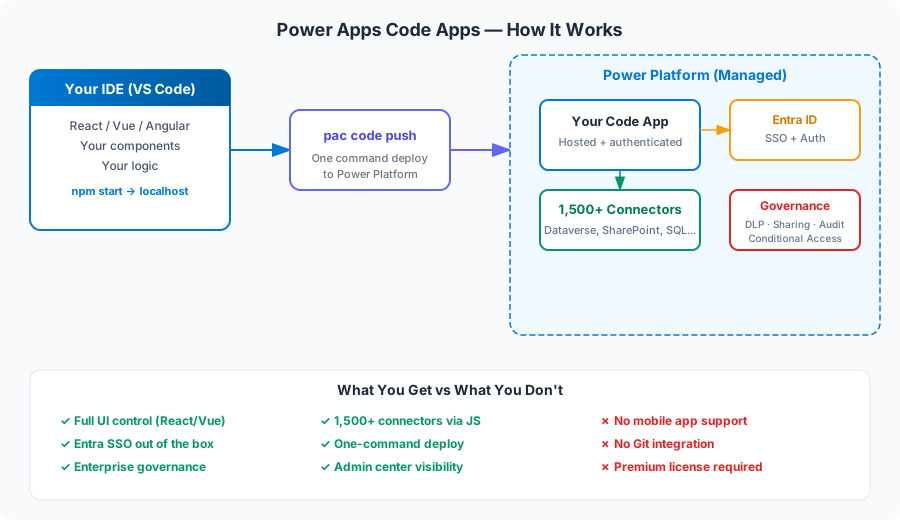
The workflow is straightforward if you’ve ever built a web app:
1. Scaffold → Use the Power Apps CLI or new npm CLI to create a project template:
npm install -g @microsoft/power-apps
power-apps code init --framework react --name my-app
2. Develop → Build your app locally in VS Code with hot reload. It’s a normal React/Vue project — npm start, browser preview, the usual.
3. Connect → Access Dataverse, SharePoint, SQL, or any of the 1,500+ connectors using the Power Apps client library:
import { useConnector } from '@microsoft/power-apps';

// Call a Power Platform connector from your React component
const results = await useConnector('sharepointonline')
  .getItems({ dataset: 'mylist' });
4. Push → Deploy to Power Platform with a single command:
pac code push --environment "https://myorg.crm.dynamics.com"5. Govern → IT manages it like any other Power App. Sharing, DLP, conditional access — all automatic.
The Real Value Proposition
Let me be direct about who this is for:
It’s for organizations that have pro developers AND Power Platform. If you’re a React developer in an enterprise that runs Power Platform, this gives you a place to deploy internal tools without setting up your own infrastructure. No Azure App Service, no CI/CD pipeline, no SSL certificates — just push and it’s live, governed, and authenticated.
It’s NOT for replacing canvas apps. If a citizen developer can build it with canvas apps, that’s still the right choice. Code Apps exist for the cases where low-code hits its ceiling — complex UIs, custom charting, integration-heavy apps where Power Fx becomes painful.
The governance angle is the real sell to IT. Right now, many organizations have developers building internal React apps deployed on random Azure subscriptions with no oversight. Code Apps bring those apps under the Power Platform umbrella — same admin center, same DLP policies, same audit trail. That’s compelling for enterprise IT.
What They Don’t Tell You
A few things the announcement blog post glosses over:
Licensing cost is real. Every user of a Code App needs Power Apps Premium at $20/user/month. For a 500-person internal tool, that’s $120,000/year in licensing alone. Compare that to hosting a React app on Azure Static Web Apps (essentially free) with Entra auth.
No mobile means no field workers. If your use case involves frontline workers on phones or tablets — warehouse, retail, field service — Code Apps are off the table. You’re back to canvas apps or a custom mobile solution.
The Per App plan is gone. Microsoft retired the Per App plan in January 2026. So you can’t do the “$10/user/app” thing anymore. It’s Premium ($20/user/month for unlimited apps) or Pay-As-You-Go ($10/active user/app/month). For Code Apps specifically, that Pay-As-You-Go option might make sense for small user bases.
Git integration isn’t there. For a feature aimed at pro developers, the lack of Power Platform Git integration is a head-scratcher. You’ll manage your source code in Git yourself (which you’d do anyway), but the Power Platform deployment side doesn’t connect to your repo.
My Take: Worth Watching, Not Worth Rushing
Code Apps solve a real problem — the gap between “this is too complex for canvas apps” and “let me spin up a whole Azure infrastructure.” That gap is real, and plenty of organizations fall into it.
But the v1 limitations are significant. No mobile, no Git integration, and the licensing math makes it hard to justify for large user bases when alternatives exist.
What I’d actually do:
- Small internal tool (< 50 users) → Code Apps make sense. Governance + auth + connectors out of the box. Pay-As-You-Go keeps costs reasonable.
- Large enterprise app (500+ users) → Do the licensing math. $20/user/month adds up fast. Azure Static Web Apps + Entra ID might be cheaper.
- Mobile required → Don’t even look at Code Apps right now. Canvas apps or a custom mobile solution.
- Complex data visualization → This is Code Apps’ sweet spot. Bring your D3.js or Recharts library, connect to Dataverse, and deploy without infrastructure work.
The feature will get better — mobile support and Git integration are almost certainly coming. For now, it’s a solid v1 for a specific use case, not a universal solution.
VP365.ai covers Microsoft 365, Copilot, and Power Platform for practitioners who want the real story, not the marketing version. More deep dives coming soon.